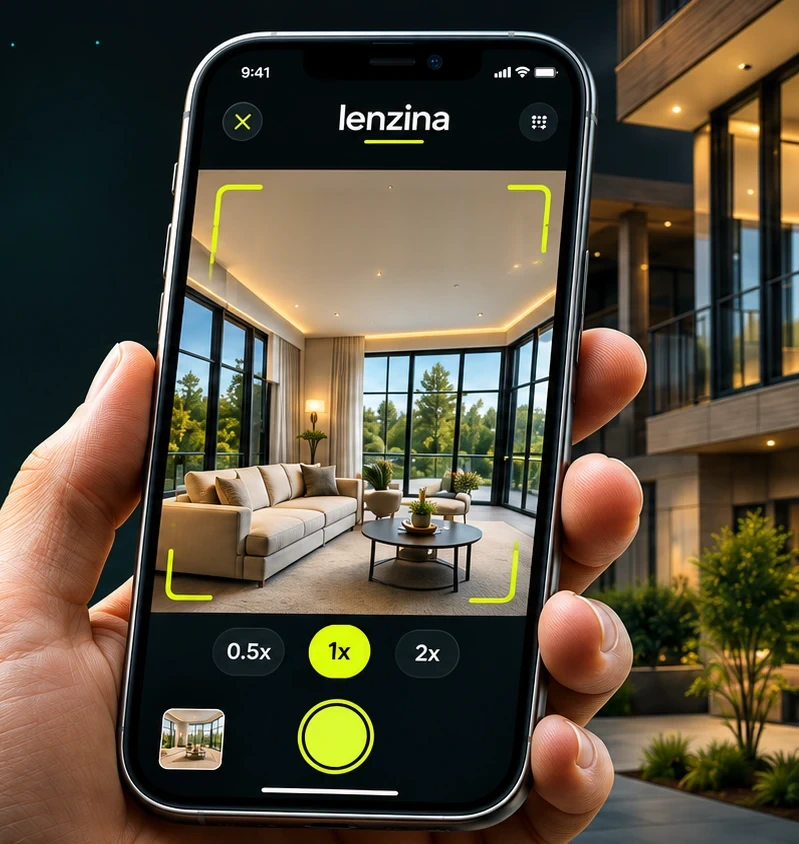
Guided capture
An on-screen level indicator and a simple room-by-room flow keep your shots straight and consistent.

The photographer in your pocket
Guided capture and AI photo enhancement for real estate agents. Coming soon to iPhone.
How Lenzina works
Walk through each room with your iPhone. An on-screen level and bracketed shots help you get straight, evenly exposed photos.
Send your shots for editing. AI enhances them, and you see free previews of the results.
Choose the photos you want and unlock them for 2 credits each. Downloading them again is free.
Before and after
Drag the slider to compare a photo straight from the camera with the enhanced version. Real Lenzina examples will appear here soon.
Illustrative image
Features
An on-screen level indicator and a simple room-by-room flow keep your shots straight and consistent.
Every shot is taken as three exposures (dark, normal and bright) with the wide or ultra-wide lens.
AI edits your photos for you. Previews are free, so you only pay for the ones you keep.
Scan room by room and level by level on iPhone models with LiDAR, then unlock a clean floor plan.
Photos are saved on your phone first, then upload to your account automatically, retrying if the connection drops.
Your photos are stored privately. Full-resolution files are only made after you unlock them, through short-lived private links.
Floor plans
Scan each room, finish each level, and get a floor plan you can download. A watermarked preview is free; the clean floor plan with dimensions is a one-time unlock per property, priced by size.
| Property size | One-time unlock |
|---|---|
| Up to 3,000 sq ft | 15 credits |
| 3,001 – 5,000 sq ft | 30 credits |
| 5,001 – 10,000 sq ft | 75 credits |
| Over 10,000 sq ft | Contact us |
Floor plan scanning needs an iPhone model with LiDAR.
Illustrative image
Examples
Example photos are on their way. These spaces show where they will go.
Illustrative image
Illustrative image
Illustrative image
Illustrative image
Illustrative image
Illustrative image
2 credits per edited photo. 1 credit = $1. No subscription.
New accounts may receive trial credits.
Lenzina is almost ready. Get a note when it is available.
FAQ
No. Previews of your edited photos are free. You only spend credits (2 per photo) when you unlock a full-resolution photo.
iPhone with iOS 17 or later. Floor plan scanning needs an iPhone model with LiDAR.
Lenzina is coming soon to iPhone. Leave your email in the box above and we will let you know when it is ready.
Professional-looking listing photos from the phone in your pocket.
Coming soon to iPhone